
Trading platforms are FREE. Introducing MT4, the industry standard:

Unlike stock trading, currency (forex) trading is usually done using software. Fortunately, this software is provided by brokers for free, and they are usually pretty easy to use once you've explored them for a few minutes. The most common one out there (99% of brokers offer it) is MetaTrader. Although MetaTrader 5 is available, it doesn't really offer anything more than MetaTrader 4 - they're pretty much interchangeable, so I won't waste your time exploring the differences, you'll make money no matter which one you use, and the interface is identical.
One last thing, MetaTrader, or MT4/MT5, is available for Windows, Mac and Linux, and there are mobile versions for both smartphones and tablets! There are also web-based versions which don't require you to download any software. The latter is ideal if you frequently use different computers, but you can also download MT4 onto your various computers and use the same login/pass details to trade using the same account.
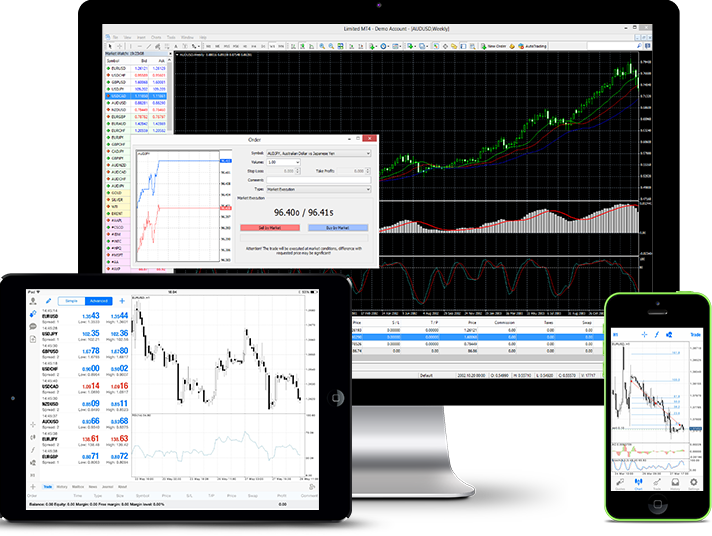
From here on out, it's probably best that you download a free demo version that you can play with using virtual money, but in real trading conditions! Most brokers offer a free demo version of MT4. The broker I recommend most for the demo account is AvaTrade (it only takes 1 or 2 minutes), you can setup a free demo account HERE. Simply click on the "21-Day Demo" link to open a demo account. Next, fill out the quick form (make sure to select MetaTrader 4 on the "Trading platform" line) and submit. Next, carefully keep the login/pass info provided on the page handy and install the software.
Launching MT4 for the first time
Once installed, launch it. Next, you should see 6 small screens, just ignore them and click on the green "+" at the top left menu to open a new chart, and pick the first one: EUR/USD. EUR/USD is the world's most traded pair and the one that offers most profit potential, due to high price liquidity; if you see that the EUR/USD is quoted at 1.0666, this simply means that 1 euro = $1.0666. Next, expand the screen so that it takes up the full screen. Next, click on the magnifying glass icon in the above menu 2 or 3 times to zoom in a bit and then switch to the "candlestick" view (press down the Alt+2 buttons at the same time) so that what you see looks more like this:
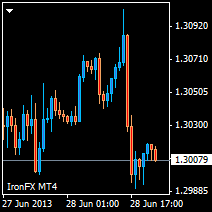
Candlesticks are better than basic line charts as they provide more info (the "body" shows the open and close price and the wicks show the high and low; the price increases all have one colour and the price declines have another). By default, MT4 first opens in the H1 timeframe. H1 is 1 hour - which means that every candlestick represents the price action over 1 hour. You'll soon use the H4 (4-hour) timeframe to identify genuine trends (while avoiding "ranges" - when the price hovers around within a confined zone with no firm direction) and the M15 (15-minute) timeframe to time your trade entries.
Placing an order
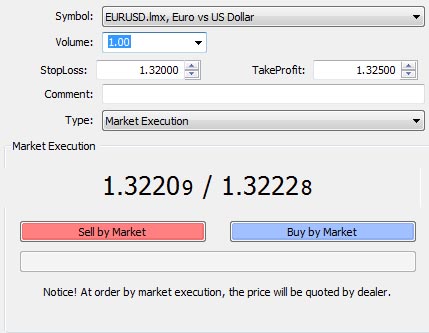
This is the crucial part (and we'll get into strategy later, for now I'm just going to explain the crucial basics). Click on the "+New Order" in the top left of the menu, this will open up the window where you will define 1) how many units, or "lots" (1 lot = 100,000 euros here) you want to trade, 2) a stop-loss price (which defines at which point you want to end the trade if it goes in the wrong direction), you ALWAYS want to set this SL level as it protects your capital and prevents you from incurring a big loss and 3) a take-profit price (the price where you cash in your profit), this is also a crucial thing to enter.
Below, you have the buy and sell buttons, which allow you to pick the direction you're trading in. Sell if you think price is going down and vice-versa.
At the bottom of the trading platform, there is a "Trade History" tab that documents all of your past trades (including respective profits and losses).